


A920PRO DUO QUICK SETUP GUIDE CONTENTS CHECKLIST
Please check the box contents after unpacking. If any components are missing, or if there is a page missing from the quick setup guide, etc., please contact the dealer.
| Name | Qty. |
| A920Pro Duo, PCI 7 Smart Terminal | 1 |
| Thermal Paper Roll | 1 |
| 2-in-1 Magnetic + Type-C cable | 1 |
| AC Power Adapter | 1 |
| Battery | 1 |
PRODUCT DESCRIPTION
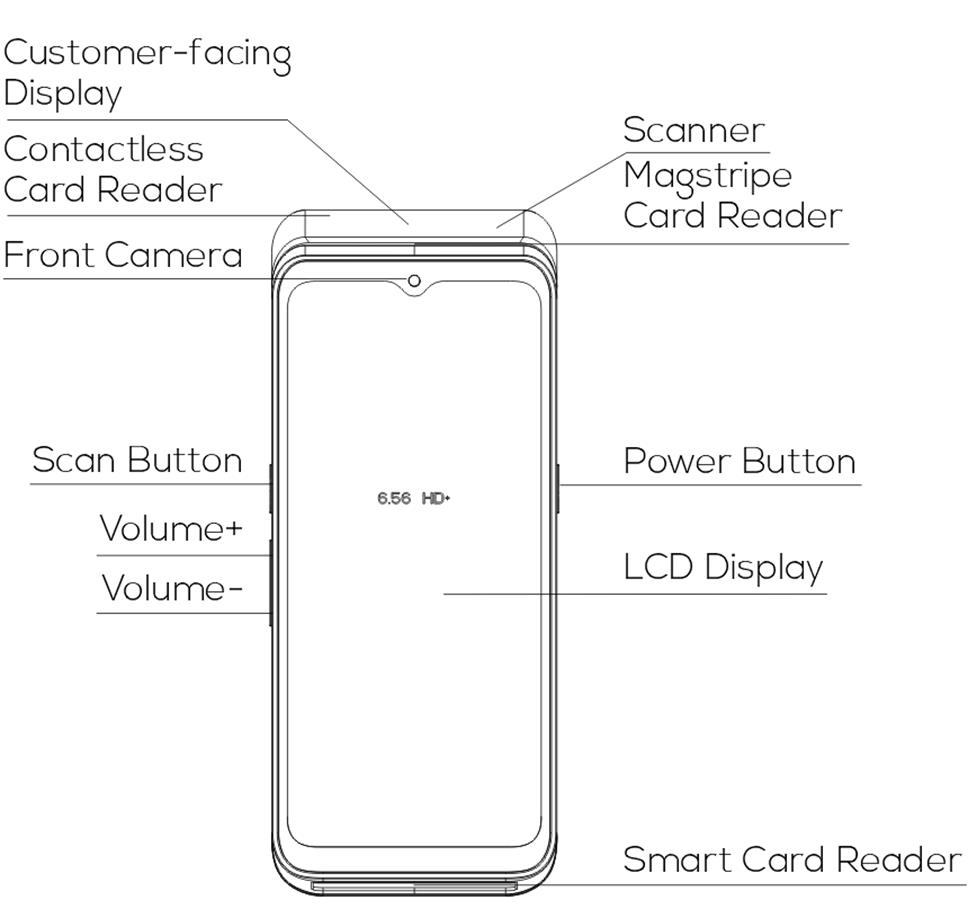
Front View:
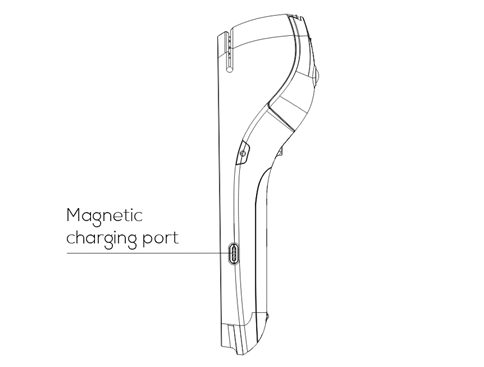
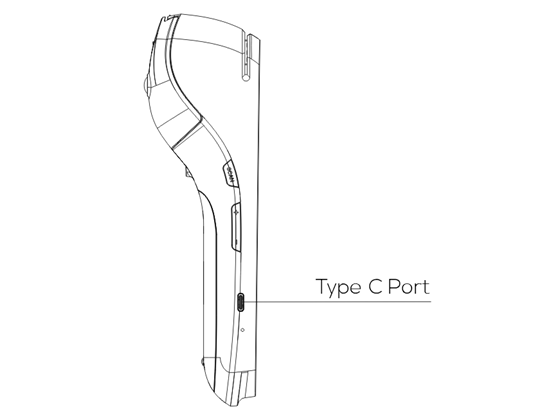
Side Views:
INSTALLATION
USB Port: connect to a USB-enabled device.
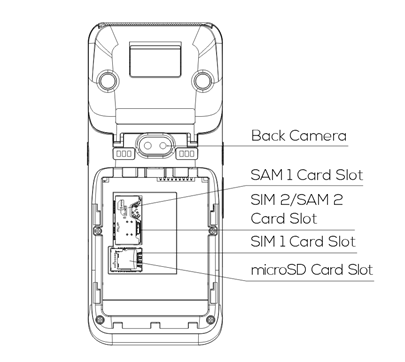
SAM/SIM/MicroSD Cards:
a) Open the battery cover underneath the terminal.
b) Remove the battery.
c) Insert SAM/SIM/MicroSD cards into the corresponding card slots.
INSTRUCTIONS
SIM/SAM Card
- Power On/Off: Power On: Press and hold the Power button for 5 seconds until the LCD lights on, showing that the terminal is being turned on. Power Off: Press and hold the Power button for 3 seconds until the shutdown menu appears, tap Power Off > Click Power Off, and “Shutting Down” will appear.
- Contactless Transactions: Tap a contactless enabled card or smartphone in proximity to the top end of the terminal where the contactless sensor is located, indicated by the contactless icon.
- Chip Card Transactions: With the card’s chip facing upwards, insert the chip card fully into the chip card slot.
- Magnetic Stripe Transactions: With the card’s magnetic stripe facing downwards, swipe the card through the magnetic reader at a constant speed, in either direction.
- Paper Receipts: Tear off the receipt at a 45-degree angle to the paper cutter.
- Battery Charging: With a charging cable connected, the device’s charging status shows on the display.
GENERAL USAGE TIPS
- Avoid placing this product in direct sunlight for extended periods, nor in environments with excessively high temperature, moisture or dust.
- Only qualified personnel should repair this product.
- Before using cards in the chip & magstripe readers, please ensure they are free from any foreign objects.
IMPORTANT SAFETY WARNING
- Do not place the terminal or battery in direct sunlight, nor in environments with excessively high temperatures, smoke, dust, or dampness.
- Do not attempt to disassemble the battery, nor insert or use foreign objects to penetrate the casing. Never place the battery in a fire or excessively hot surfaces. Take care not to drop the battery. Excessive external shocks or pressure could cause battery liquid leakage or result in the battery catching fire or even exploding. Keep the battery well away from children and animals.
- Immediately replace any battery which appears to be deformed, expanded or in an overheated state.
- We recommend you only use power adaptors supplied by PAX Technology. If you must use 3rd party supplier accessories, please ensure specifications meet exactly those recommended for our products, which must comply with international and local regulations & standards. Non-compatible power supplies, chargers or batteries could cause fires or even explosions, and will invalidate any product warranty.
- Charge the battery when the indicator level is low, but make sure to never charge a battery continuously for more than 24 hours. If a battery is not used for a long time, please charge it at least once every 6 months to avoid overcharge or discharge damage. For long-term optimal product performance, it is recommended that a battery be replaced after 2 years of continual usage.
- When disposing of the device, battery, or accessories, please do so responsibly and according to local regulations. These are not household waste items. Improper disposal of the battery could cause a fire or explosion, and any liquid leakage could be damaging to the environment and toxic to humans & animals.
- Please use a PAX adaptor and cable for better battery result and device life.
- For a better experience, it’s recommended to replace the battery if it has been used for more than 2 years.
WORKING MODE TIPS
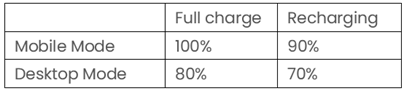
The A920Pro has a BMS (Battery Management System) function to protect the lithium battery from being over-charged, so the A920Pro can work either on Desktop mode or Mobile Mode (Select “Settings” > “Battery” > “More Settings” > ”Power Supply Work Mode”).
- Desktop Mode
- The terminal is mainly powered by external power supply, which includes charging base, power adapter and wireless charging.
- The terminal is mainly powered by external power supply, which includes charging base, power adapter and wireless charging.
- Mobile Mode
- The terminal is mainly powered by battery, and generally no external power is inserted.
- We specify different charging and discharging parameters for the two working modes, as detailed below.
- The device is restricted to indoor use only when operating in the 5150 to 5350 MHz frequency range.

ENVIRONMENTAL PARAMATERS
- Working Environment:Temperature: 0℃~45℃(32℉~113℉)
- Storage Environment:Temperature:-20℃~70℃(-4℉~158℉)
- Humidity:5%~95% (non-condensing)
NOTES
This A920Pro is in compliance with Directive 2014/53/EU.Existing password board are provided with the product as detachable hardware. The product requires merchants to equip their own professional cashier to help disabled people open the accessibility function and reset the volume and other operations.
PAX does not provide support services to any party in connection with this request.
FCC Compliance statement
This device complies with Part 15 of the FCC Rules. Operation is subject to the following two conditions: (1) this device may not cause harmful interference, and (2) this device must accept any interference received, including interference that may cause undesired operation.
Changes or modifications not expressly approved by the party responsible for compliance could void the user’s authority to operate the equipment.
This equipment has been tested and found to comply with the limits for a Class B digital device, pursuant to Part 15 of the FCC Rules. These limits are designed to provide reasonable protection against harmful interference in a residential installation. This equipment generates, uses and can radiate radio frequency energy and, if not installed and used in accordance with the instructions, may cause harmful interference to radio communications. However, there is no guarantee that interference will not occur in a particular installation.
If this equipment does cause harmful interference to radio or television reception, which can be determined by turning the equipment off and on, the user is encouraged to try to correct the interference by one or more of the following measures:
— Reorient or relocate the receiving antenna.
— Increase the separation between the equipment and receiver.
— Connect the equipment into an outlet on a circuit different from that to which the receiver is connected.
— Consult the dealer or an experienced radio/TV technician for help.
FCC SAR statement
This equipment complies with FCC radiation exposure limits set forth for an uncontrolled environment. End user must follow the specific operating instructions for satisfying RF exposure compliance. This transmitter must not be co-located or operating in conjunction with any other antenna or transmitter.
The portable device is designed to meet the requirements for exposure to radio waves established by the Federal Communications Commission (USA). These requirements set a SAR limit of 1.6 W/kg averaged over one gram of tissue. The highest SAR value reported under this standard during product certification for use when properly worn on the body
ISED compliance statement
This device contains licence-exempt transmitter(s)/receiver(s) that comply with Innovation, Science and Economic Development Canada’s licence-exempt RSS(s). Operation is subject to the following two conditions:
(1) This device may not cause interference.
(2) This device must accept any interference, including interference that may cause undesired operation of the device.
L’émetteur/récepteur exempt de licence contenu dans le présent appareil est conforme aux CNR d’Innovation, Sciences et Développement économique Canada applicables aux appareils radio exempts de licence. L’exploitation est autorisée aux deux conditions suivantes :
(1) L’appareil ne doit pas produire de brouillage;
(2) L’appareil doit accepter tout brouillage radioélectrique subi, même si le brouillage est susceptible d’en compromettre le fonctionnement.
The device for operation in the band 5150–5250 MHz is only for indoor use to reduce the potential for harmful interference to co-channel mobile satellite systems;
le dispositif utilisé dans la bande 5150-5250 MHz est réservé à une utilisation en intérieur afin de réduire le risque de brouillage préjudiciable aux systèmes mobiles par satellite dans le même canal;
IC SAR statement
This equipment complies with ISED radiation exposure limits set forth for an uncontrolled environment. End user must follow the specific operating instructions for satisfying RF exposure compliance. This transmitter must not be co-located or operating in conjunction with any other antenna or transmitter.
The portable device is designed to meet the requirements for exposure to radio waves established by the ISED. These requirements set a SAR limit of 1.6 W/kg averaged over one gram of tissue. The highest SAR value reported under this standard during product certification for use when properly worn on the body.
Cet équipement est conforme aux limites d’exposition aux rayonnements ISED établies pour un environnement non contrôlé. L’utilisateur final doit suivre les instructions spécifiques pour satisfaire les normes. Cet émetteur ne doit pas être co-implanté ou fonctionner en conjonction avec toute autre antenne ou transmetteur.
Le dispositif portatif est conçu pour répondre aux exigences d’exposition aux ondes radio établie par le développement énergétique DURABLE. Ces exigences un SAR limite de 1,6 W/kg en moyenne pour un gramme de tissu. La valeur SAR la plus élevée signalée en vertu de cette norme lors de la certification de produit à utiliser lorsqu’il est correctement porté sur le corps.

The Bluetooth® word mark and logos are registered trademarks owned by Bluetooth SIG, Inc. and any use of such marks by PAX Technology, Inc. is under license. Other trademarks and trade names are those of their respective owners.
PAX Technology Inc reserves the right to change product technology specifications without notification.
TERMINAL INSTALLATION AND USAGE TIPS
• If any cables become damaged, seek a replacement.
• Do not insert unknown materials into any port on the A920 Pro; this may cause serious damage.
• If repairs are required, please contact a professional technician instead of attempting them on your own.
• Avoid exposing the device to an excessively hot, dusty, or strong electromagnetic environment.
• Do not vibrate, shake, or drop the device.
CAUTION: Changes or modifications not expressly approved by the party responsible for compliance could void the user’s authority to operate the equipment.