


PAX A35 Manual Table of Contents
Contents Checklist
Congratulations on receiving your PAX Technology payment terminal. We do hope you enjoy it! Please check the contents after unpacking. If any components are missing or a page is missing from the Quick Setup Guide, please contact your PAX dealer. The box you have just opened should contain the following items:
| Name | Qty. |
| PAX A35 POS Terminal | 1 |
| A35 Quick Setup Guide | 1 |
| Communication Cable | 1 |
| AC Power Adapter (Optional) | 1 |
Product Description
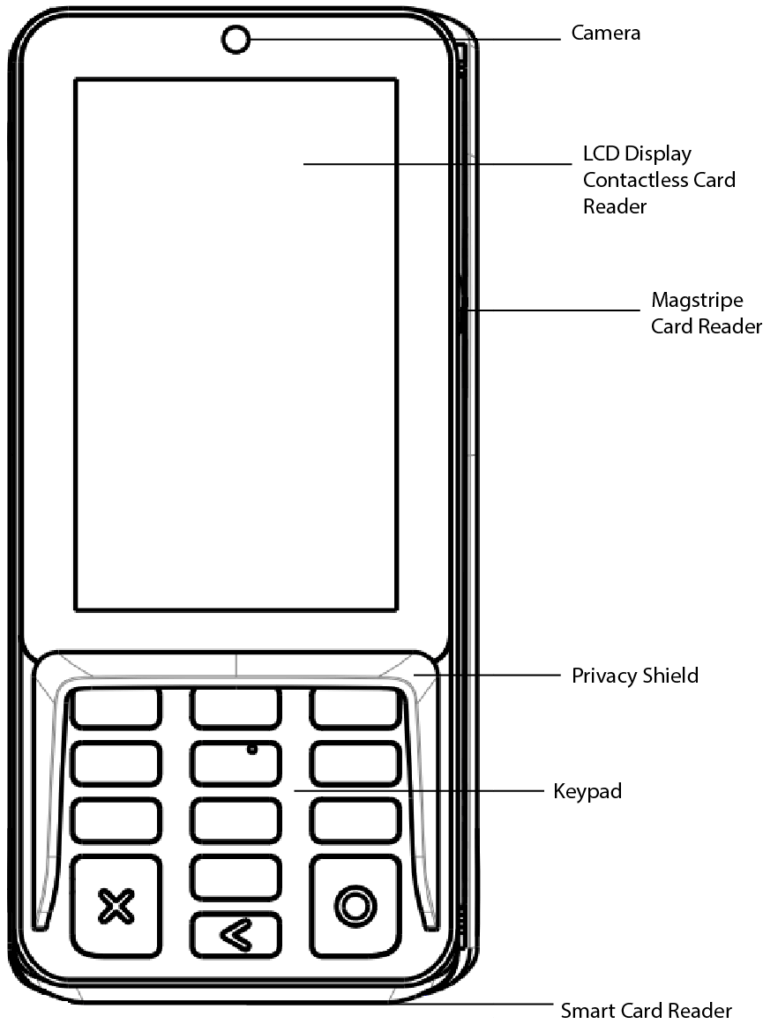
The following section points out the various hardware features and functions of the PAX A35 PIN pad.
Front View:
Basic Operating Instructions
The A35 typically connects to a retail POS system or ECR, or a standalone payment terminal via a communication cable. The following instructions describe how the product is correctly used:
Power Connections
The power method varies by the cable, either supplied to the A35 by connecting the AC adapter to the DC port on the communication cable (default) or via a Powered USB cable (optional).
Operating System Reset
Press & hold the X and O keys for 5-8 seconds.
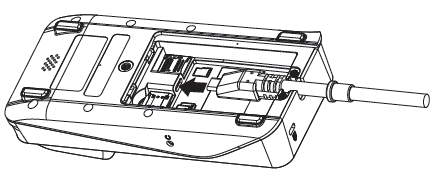
Communication Cable
Remove the back cover and insert the comms cable head into the Type-C interface.
SAM & microSD Cards
Remove the back cover & insert the cards into their corresponding card slots.
Magnetic Stripe Card Reader
Face the card’s magstripe inwards toward the A35, swipe the card completely up or down in a constant, steady manner.
(Supports bi-directional swiping).
Integrated Circuit (IC, or Chip Card) Reader
Face the card’s microchip upward and insert firmly into the slot.
Contactless Card Reader
Tap the contactless card or mobile wallet near the top of the A35’s LCD screen, indicated by the universal contactless icon.
1D/2D Code Reader
When the A35 has an inbuilt camera, scan the 1D/2D code toward the top central area of the LCD screen.
Electronic Signature
Use your finger to sign on the LCD screen. Never use metal or sharp objects to operate the touchscreen, as it could get damaged.
Anti-Theft Mechanism
A Kensington Lock on the rear side of the A35 allows owners to secure the device, if necessary, to a pole stand or other countertop fixture.
Audio Jack
The A35 supports a 3.5mm audio jack, useful for software applications developed to allow visually impaired customers to connect a headphone for voice prompting.
Terminal Installation & General Usage Tips
- Avoid placing this product in direct sunlight for extended periods, nor in environments with excessively high temperatures, moisture, or dust.
- Only qualified personnel should repair this product.
- Before using cards in the chip & magstripe readers, please ensure they are free from any foreign objects.
Password & PIN Entry Tips
PAX recommends entering passwords and inputting Personal Identification Numbers (PINs) as follows:
- Place the A35 at an appropriate angle so that it is difficult for another person to see the PIN or password being entered.
- Shield password entry from any nearby video surveillance.
- Use body or freehand to block the view of the keypad.
Environmental Parameters
Working Environment
Temperature: 0℃-50℃ (32℉~122℉) (non-charging).
Storage Environment
Temperature: -20℃~70℃ (-4℉~158℉) (non-charging).
Humidity
5%~93% (non-condensing).
Cleaning the Device
- Avoid industrial-strength or abrasive cleaners, as they can damage or scratch the screen.
- Do not immerse the A35 in water or liquid.
- Do not spray water or cleaner into ports.
- To clean the screen, apply distilled water or mild glass cleaner onto a soft, lint-free cloth and gently wipe the terminal.
Index of Icons


- Dispose of in a professional recycling manner
- Class II equipment
- For indoor use only
- Energy efficiency marking
- AC voltage
- DC voltage
- microSD logo
Trademark Notice: microSD logo is a trademark of SD-3C LLC.
Compliance Statements
- Hereby, PAX Computer Technology (Shenzhen) Co., Ltd. declares that the radio equipment type A35 complies with Directive 2014/53/EU.
- The full text of the EU declaration of conformity is available at the following internet address: https://www.pax.com.cn/product/ce/list/
- This product complies with Directive 2019/882/EU.
- The user manual of this product is intended for merchants, not consumers.
- For the unattended scenario, the installation height should be between 800mm and 1100mm. The minimum horizontal distance should be 450mm.
- For the attended scenario, the product requires merchants to assist people with disabilities by enabling accessibility functions and adjusting the volume and other settings. PAX does not provide support services to any party in connection with this request.
- If this product needs to be fixed in place or cannot be easily moved, the installation and placement standards follow the same requirements as those for the unattended scenario.
Certifications
This product has obtained key international & payment industry certifications, such as:
- TQM
- PCI PTS 6.x, SRED
- EMV L1 & L2
- EMV CL L1
- Mastercard PayPass
- Visa PayWave
- American Express Expresspay
- Discover D-PAS
- JCB J/Speedy
- Interac Flash
- qUICS
- UL
- FCC
- IC
- CE
- RoHS
FCC Compliance Statement
This equipment has been tested and found to comply with the limits for a Class B digital device, as per Part 15 of the FCC Rules. These limits are designed to provide reasonable protection against harmful interference in a residential installation. This equipment generates, uses, and can radiate radio frequency energy if not installed and used in accordance with the instructions, which may cause harmful interference to radio communications.
However, there is no guarantee that interference will not occur in a particular installation. If this equipment does cause harmful interference to radio or television reception, which can be determined by turning the equipment off and on, the user is encouraged to try to correct the interference by one of the following measures:
- Reorient or relocate the receiving antenna.
- Increase the separation between the equipment and receiver.
- Connect the equipment to an outlet on a circuit different from the one the receiver is connected to.
- Consult the dealer or an experienced radio/TV technician for help.
FCC Caution:
- Any changes or modifications not expressly approved by the party responsible for compliance could void the user’s authority to operate this equipment.
- This transmitter must not be co-located or operating in conjunction with any other antenna or transmitter.
- This equipment must be installed and operated in accordance with the provided instructions, and the antenna(s) used for this transmitter must be installed to provide a separation distance of at least 20 cm from all persons. It also must not be co-located or operating in conjunction with any other antenna or transmitter. End-users and installers must be provided with antenna installation instructions and transmitter operating conditions to fulfill RF exposure compliance.
FCC Supplier’s Declaration of Conformity
POS Terminal /A35
This device complies with part 15 of the FCC Rules. Operation is subject to the following two conditions: (1) This device may not cause harmful interference, and (2) this device must accept any interference received, including interference that may cause undesired operation.
Responsible Party: PAX Technology, Inc.
8775 Baypine Road Jacksonville, FL 32256 United States
Help-desk :1 877-859-0099
ISED Notice
This A35 device contains license-exempt transmitter(s)/receiver(s) that comply with Innovation, Science and Economic Development Canada’s license-exempt RSS(s). Operation is subject to the following two conditions:
- This device may not cause interference.
- This device must accept any interference, including interference that may cause undesired operation.
L’émetteur/récepteur exempt de licence contenu dans le présent appareil est conforme aux
CNR d’Innovation, Sciences et Développement économique Canada applicables aux appareils radio exempts de licence. L’exploitation est autorisée aux deux conditions suivantes :
- L’appareil ne doit pas produire de brouillage;
- L’appareil doit accepter tout brouillage radioélectrique subi, même si le brouillage est susceptible d’en compromettre le fonctionnement.
Cet émetteur ne doit pas être Co-placé ou ne fonctionnant en même temps qu’aucune autre antenne ouémetteur.Cet équipement devrait être installé et actionné avec une distance minimum de 20 centimètres entre leradiateur et votre corps.
The device for operation in the band 5150–5250 MHz is for indoor use only to minimize the potential for harmful interference to co-channel mobile satellite systems.
Le dispositif a étéutilisé pour la construction de la bande 5150 à 5250 MHz pour la consommation de matériel pour réduire le potentiel pour les systèmes de télévision mobiles.
This transmitter must not be co-located or operating in conjunction with any other antenna or transmitter. This equipment should be installed and operated with a minimum distance of 20 centimeters between the radiator and your body.
Cet émetteur ne doit pas être Co-placé ou ne fonctionnant en même temps qu’aucune autre antenne ouémetteur.Cet équipement devrait être installé et actionné avec une distance minimum de 20 centimètres entre leradiateur et votre corps.
PAX Technology, Inc. reserves the right to change product technology specifications without prior notification.
PAX continually invests to maintain its high-quality products up to date with the latest certifications; therefore, a comprehensive list can be requested via the website’s contact form or through downloadable product brochures.

PAX Technology, Inc.
North American Headquarters:
8800 Baymeadows Way West
Suite #500 / Floor 5
Jacksonville, FL 32256
Phone: +1 877 859 0099
Email: [email protected]
Website: www.pax.us